
Resource guide
How to Increase Customer Review Response Rates
Most customers are willing to leave a review. They just never finish the request. This guide explains how to increase customer review response rates using timing, message wording, channel choice, follow-ups, and campaign tracking.
On this page
Quick Answer: What Improves a Review Request Response Rate?
A review request response rate improves when the request is easy to act on. Send it soon after a completed experience. Keep the message short and personal. Use a channel the customer already expects, such as WhatsApp, SMS, or email. Link directly to the review form so the customer can finish in one or two taps. Make sure the whole journey works on a phone. Send one polite follow-up at most, then track completed reviews by campaign so you can see what actually works.
Key Takeaways
- Send the review request soon after the experience is complete, while the visit or purchase is still fresh.
- Use one direct link that opens the review form. Never ask customers to search for your business.
- Keep the message short, personal, and neutral. Ask for an honest review, not a positive one.
- Use the channel your customers already expect, such as WhatsApp, SMS, or email.
- Send one polite follow-up at most, and respect every opt-out.
- Measure completed reviews against delivered requests, not attempted sends.
- Build your own 30-day baseline instead of chasing universal benchmarks.
What Is a Review Request Response Rate?
A review request response rate measures one thing: the percentage of customers who complete a review after your review request reaches them. It tells you how well your review collection process turns delivered requests into completed customer reviews.
Definition
A review request response rate is the percentage of customers who submit a completed review after receiving a review request that was successfully delivered to them.
It is just as important to know what this metric does not measure. A review request response rate does not measure:
- How often your business replies to published reviews. That is a review reply rate.
- Email opens or link clicks on their own. Those are engagement signals, not completed reviews.
- Website, product page, or ecommerce conversion. Those metrics track sales, not reviews.
- The revenue impact of reviews. If you want to understand how customer reviews influence sales, that is a separate topic with its own guide.
Keeping these ideas separate matters. If you mix opens, clicks, and sales into one number, you cannot tell which part of your review request process needs fixing.
How to Calculate Review Request Response Rate
Use this formula:
Formula
Review request response rate = Completed reviews ÷ Delivered review requests × 100
Use delivered requests, not attempted sends.
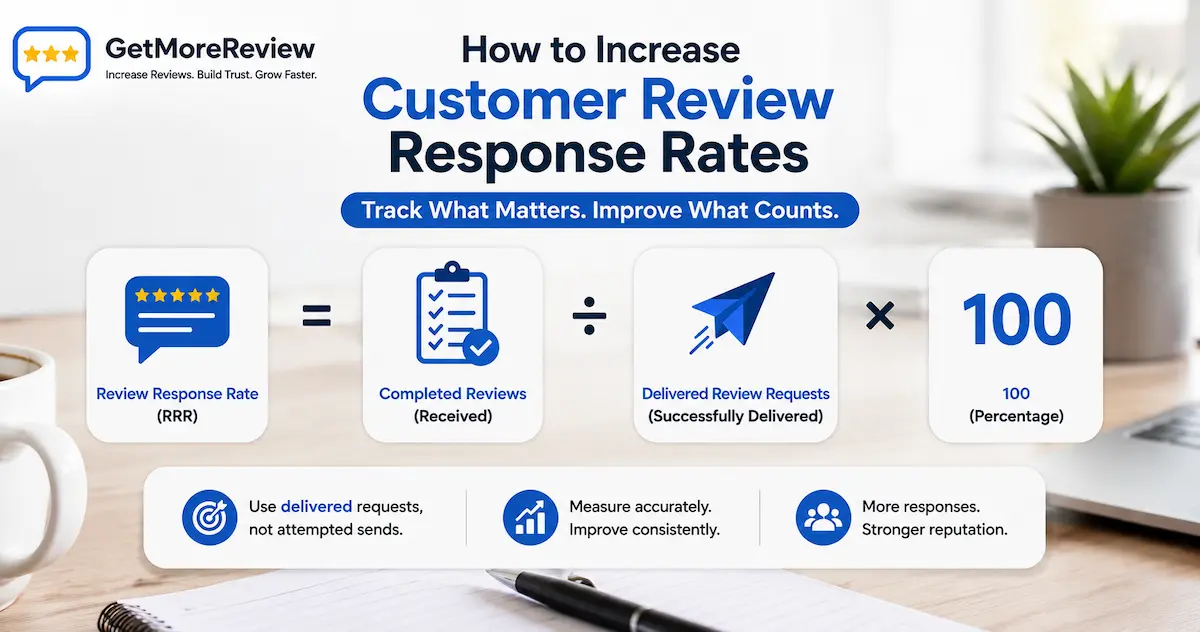
Always divide by delivered requests, not attempted sends. Attempted sends include bounced emails, invalid phone numbers, and blocked messages. Those customers never saw your request, so they tell you nothing about your message or timing. Counting them mixes two separate problems together: contact data quality and request quality. Keep them apart. Track your delivery rate to fix bad contact data, and track your response rate to improve the request itself.
Example calculation, not a benchmark
A salon sends 220 review requests in one month. 200 requests are successfully delivered and 20 bounce. 30 customers complete a review. The response rate is 30 ÷ 200 × 100 = 15 percent. This shows the maths only. It is not an industry benchmark or a target.
Review Request Response Rate vs Other Metrics
Several metrics sound similar but measure different things. The highlighted row is the metric this guide covers. The lower rows belong to separate topics with their own goals.
| Metric | What it measures | Formula or signal | Where it is used |
|---|---|---|---|
| Review request response rate | Completed reviews after delivered review requests | Completed reviews ÷ delivered requests × 100 | Review collection campaigns |
| Review request click-through rate | How many recipients tap the review link | Link clicks ÷ delivered requests × 100 | Message and channel testing |
| Review completion rate | How many customers who click actually finish the review form | Completed reviews ÷ link clicks × 100 | Review page and mobile form testing |
| Email open rate | How many recipients open a review request email | Opens ÷ delivered emails × 100 | Email subject line testing |
| Business review reply rate | How often a business answers its published reviews | Business replies ÷ published reviews × 100 | Reputation management |
| Ecommerce conversion rate | Website visitors who complete a purchase | Orders ÷ sessions × 100 | Online store optimisation |
| Review widget conversion rate | Visitor actions influenced by an on-site review widget | Varies by widget and website goal | Website optimisation |
Swipe the table sideways to see all columns.
Review Request Response Rate Benchmarks by Channel
There is no universal review request benchmark that applies to every company. Published numbers vary because businesses differ in industry, audience age, consent quality, request timing, message wording, review platform sign-in friction, and even how they count a delivered request. Two companies can run the same campaign and report very different numbers simply because they measure differently.
Instead of chasing someone else's number, compare channels by fit. The table below shows what each channel is good at and what usually goes wrong.
| Channel | Best use case | What to track | Main advantage | Common problem |
|---|---|---|---|---|
| Customers who already message your business on WhatsApp | Delivered requests, link clicks, completed reviews, opt-outs | Personal, familiar, and easy to open a link in one tap | Requires proper opt-in and correct business messaging setup | |
| SMS | Local service businesses with customer phone numbers and consent | Delivered requests, link clicks, completed reviews, opt-outs | Short, direct, and read quickly on any phone | Strict consent rules and per-message costs in some countries |
| Businesses with clean email lists, receipts, or accounts | Delivered emails, opens, clicks, completed reviews, unsubscribes | Low cost, room for context, easy automation | Crowded inboxes and spam filtering reduce visibility | |
| QR code | In-person moments at the counter, table, or reception desk | Scans, completed reviews, placement location | Removes typing and searching at the exact moment of service | Poor placement or no staff prompt means the code is ignored |
| Printed receipt | Retail and hospitality with printed receipts | Completed reviews during the campaign period | Reaches every paying customer with zero extra messages | Hard to attribute reviews to the receipt without a unique link |
| In-person verbal request | High-trust services such as dental, legal, and trades | Reviews completed after the visit, staff member who asked | A personal ask from a real person carries weight | Customers forget quickly without a link or QR code to act on |
Swipe the table sideways to see all columns.
Best practice: build a 30-day baseline
Pick one channel and one message. Send that same request to every eligible customer for 30 days. Count how many requests were delivered and how many reviews were completed. Divide completed reviews by delivered requests. That number is your baseline. From then on, change one thing at a time and compare each month against it. Tracking your own numbers is the fastest way to learn how to increase customer review response rates for your specific business.
9 Proven Ways to Increase Customer Review Response Rates
The nine methods below show how to increase customer review response rates step by step. They are ordered by where customers drop off, so work through them in sequence. Each one removes a reason for a customer to ignore, abandon, or forget your request.
Ask at the Right Moment
Send the request after the experience is genuinely complete, while it is still fresh in the customer's mind. A request sent mid-service feels pushy. A request sent weeks later meets a customer who has moved on. The right window depends on the business:
- Restaurants: the same evening or the next morning after the visit.
- Dental practices: later the same day, once the patient is home and comfortable.
- Salons: shortly after the appointment ends, while the result still feels new.
- Contractors: after the job is finished and the customer has confirmed the final walkthrough.
- Ecommerce stores: after delivery is confirmed and the customer has had time to use the product, not when the order ships.
- Hotels: on checkout day or shortly after departure.
- SaaS companies: after a real milestone, such as finished onboarding or a solved support ticket, not on signup day.
There is no proven perfect hour that applies to every business. The principle is simple: the request should follow a completed experience, and the shorter the gap, the easier it is for the customer to remember and respond.
Use One Direct Review Link
Every extra step loses people. If your message says "search for us on Google and leave a review," the customer has to open an app, type your name, pick the right listing, find the review button, and then write. Most give up along the way.
A direct review link removes all of that. One tap should open the exact review form for your business, ready to write. Test the link yourself on a phone before any campaign. For in-person moments, a QR code does the same job: the customer scans it at the counter or table and lands straight on the review form. One request, one link, one action.
Keep the Message Short
Long messages get skimmed or ignored. A strong review request message has four parts:
- Recognition or thank-you: one line that acknowledges the visit or purchase.
- Clear request: one sentence asking the customer to share their experience.
- Direct link: the review link, on its own, easy to tap.
- Honest-review wording: ask for an honest review, never a positive one.
There is no proven universal word limit. The real rule is that every sentence must earn its place. If a line does not thank the customer, make the ask, or provide the link, cut it.
Personalise the Request
A message that clearly comes from a real business, about a real visit, gets more attention than a generic blast. Useful personalisation includes the customer's first name, your business name, the service they received, the product they bought, the appointment date, the location they visited, and the staff member who served them.
Warning
Wrong personalisation is worse than none. "Hi Sarah" sent to Ahmed destroys trust instantly. If your customer data is messy, fix the data first or drop the name field until it is reliable.
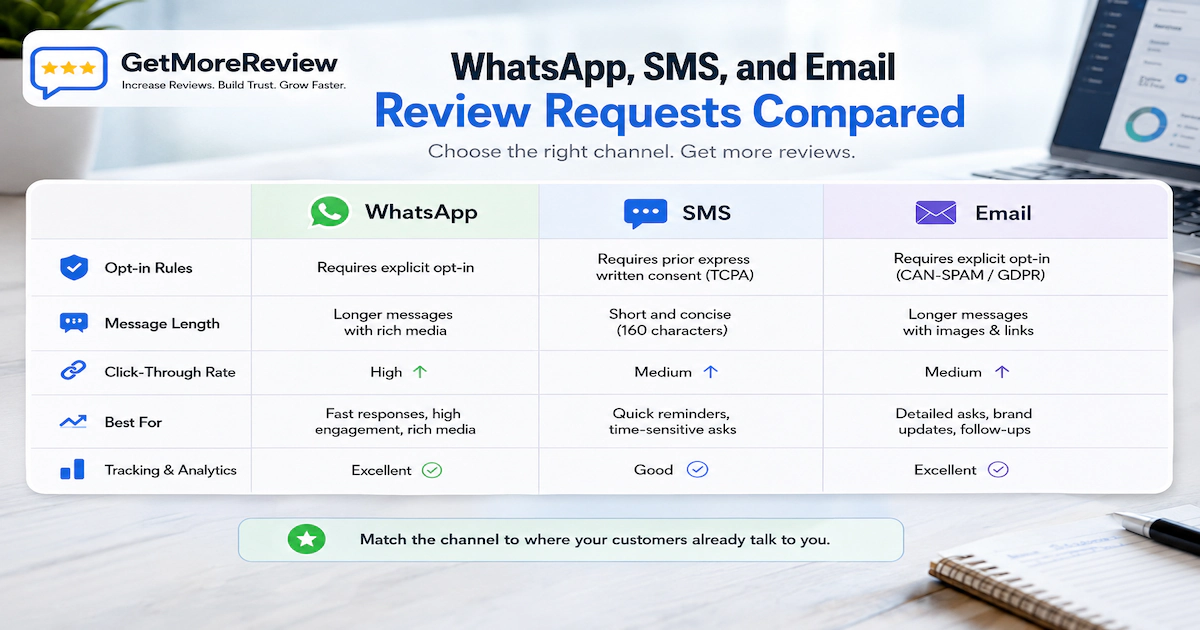
Choose WhatsApp, SMS, or Email by Audience
The best channel is the one your customers already use with your business. If they book on WhatsApp, ask on WhatsApp. If they only gave you an email at checkout, ask by email. Sending a request through an unexpected channel makes it feel like spam, whatever the wording says.
| Channel | Works best when | Watch out for |
|---|---|---|
| Customers already message you there and have opted in | Business messaging setup and opt-in rules | |
| SMS | You hold phone numbers with clear marketing consent | Consent laws and per-message costs |
| You have clean addresses from bookings or receipts | Spam filters and crowded inboxes |
Each channel has its own setup, wording style, and consent rules. The full channel guides cover the details:
Send One Polite Follow-Up
People forget. A customer can fully intend to leave a review and then get pulled away by daily life. One gentle reminder a few days after the first request gives them a second chance to act, and it often recovers reviews the first message missed.
Keep firm limits. Send one follow-up only, and skip customers who already clicked or reviewed. Do not claim urgency, and do not send a third message. Repeated reminders turn a friendly request into a nuisance and can push customers to opt out or complain. Always include a clear way to opt out, honour every opt-out immediately, and only message customers who consented to hear from you.
Make the Review Journey Mobile-Friendly
Most review requests are opened on a phone, so test the whole journey on a phone. Check every step:
- Link opening: does the link open directly, without warnings or app-switch confusion?
- Correct business profile: does it open your listing, not a branch with a similar name?
- Mobile form: does the review form load and display properly on small screens?
- Sign-in friction: what happens if the customer is not signed in to the review platform?
- Button size: are the tap targets big enough for a thumb?
- Page speed: does everything load within a couple of seconds on mobile data?
- Broken redirects: does any shortened or tracked link still land on the right page?
Repeat this test on both Android and iPhone. A journey that works on one can quietly break on the other.
Test Timing and Message Wording
Simple A/B testing tells you what works for your customers instead of guessing. Split your requests into two groups, change exactly one thing, and compare completed reviews after the same period. Test one variable at a time, or you will not know which change made the difference. Good starter tests:
- Same-day sending vs next-day sending
- A short message vs a slightly more detailed message
- Different button or link text
- A follow-up after two days vs after five days
- WhatsApp vs SMS for the same customer segment
Give each test enough volume to matter. A difference between 5 requests and 6 requests means nothing. Run the test until both groups have a meaningful number of delivered requests, then keep the winner and test the next variable.
Track Completion by Campaign
You cannot improve a review campaign response rate you do not measure. For every campaign, record requests attempted, requests delivered, link clicks, completed reviews, response rate, channel used, send time, follow-up status, location or branch, campaign name, and opt-outs.
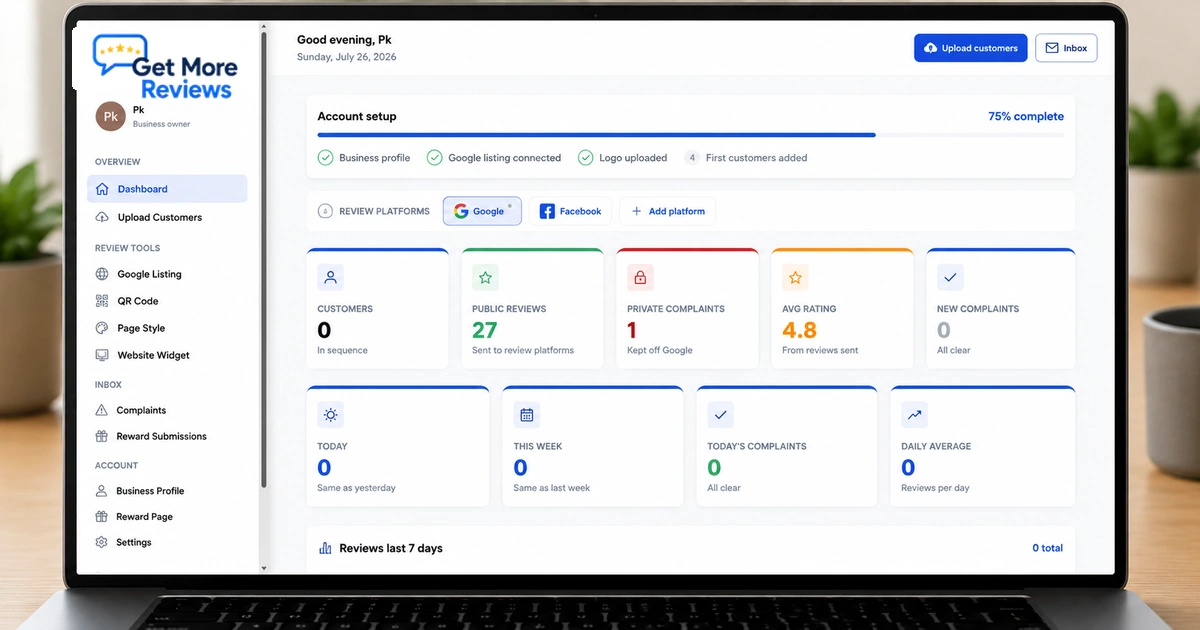
Completed reviews matter more than opens or clicks alone. Opens and clicks can look healthy while almost nobody finishes the review form, which usually points to a broken link or a painful mobile journey. A spreadsheet works at small volume. As volume grows, a review request tool can record delivery, clicks, and completed reviews per campaign automatically.
Review Request Message Examples
The templates below use neutral wording and ask for an honest review. Adjust the placeholders to match your business.
Hi [Name], thank you for visiting [Business] today. Would you share an honest review of your experience? It takes about a minute: [link] Reply STOP to opt out.
Hi [Name], thanks for choosing [Business]. Could you share your experience in a quick honest review? [link] Reply STOP to opt out.
Subject: How was your visit to [Business]? Hi [Name], Thank you for choosing [Business] on [date]. If you have a minute, we would value an honest review of your experience. It helps other customers and helps us improve. [link] Thank you, [Staff name]
Hi [Name], a gentle reminder from [Business]. If you have a minute, we would still value your honest review: [link] No need to reply if you would rather not, and thank you either way.
Hi [Name], thank you for your appointment with [Staff name] at [Business] today. Would you share your experience in an honest review? [link]
Hi [Name], we hope you are enjoying your [product] from [Business]. Once you have had a chance to use it, would you share an honest review? [link]
Hi [Name], thank you for working with [Business] on [project]. Now that the project is complete, would you share an honest review of your experience with our team? [link]
Real Example: Improving a Review Request Campaign
Bright Lane Dental is a fictional clinic. The numbers below show how a business can measure and improve its own campaign. They are not a benchmark and they do not predict your results.
Bright Lane Dental relied on receptionists asking patients verbally at the front desk. Reviews arrived slowly and nobody measured anything, so the clinic could not tell what was working.
Once a week, the office manager also sent a batch of SMS messages to that week's patients. The message was five sentences long and linked to the clinic's Google Business Profile page rather than the review form itself.
The clinic first measured a full month without changing anything. It sent 150 SMS requests, of which 138 were delivered. 11 patients completed a review. Baseline response rate: 11 ÷ 138 × 100, which is about 8 percent.
The next month, the clinic changed four things. Requests went out the same evening as each appointment instead of in a weekly batch. The message was cut to three sentences. The link was replaced with a direct review link that opened the review form in one tap. A single follow-up went out three days later to patients who had not clicked.
In the second month, 142 requests were delivered and 19 patients completed reviews. That is 19 ÷ 142 × 100, which is about 13 percent.
Two problems had been hiding in plain sight. The weekly batch meant some patients received the request six days after their visit, and the old link opened the business profile page where many patients never found the review button. Fixing timing and the link mattered more than any wording change. The clinic kept measuring monthly against its own baseline.
Common Reasons Customers Do Not Respond
Knowing how to increase customer review response rates also means knowing what pushes them down. When a review request completion rate stays low, one or more of these problems is usually the cause:
- The request was sent too early, before the experience finished.
- The request was sent too late, after the customer moved on.
- The sender was not recognised, so the message looked like spam.
- The review link was broken or opened the wrong page.
- The journey had too many steps between the message and the review form.
- The message was too long to read at a glance.
- The message contained several calls to action instead of one.
- The review page was slow or awkward on mobile.
- Repeated reminders annoyed the customer.
- The message gave no context about the visit or purchase.
- The wrong customer name appeared in the greeting.
- The request asked for five stars, which feels manipulative and breaks platform rules.
- The customer had already left a review.
- The customer never consented to marketing communication.
- The review form required an unexpected login the customer did not have.
Best Practices for Ethical Review Requests
Best practice: ethical review requests
- Ask consistently. Every eligible customer gets the same neutral request.
- Use neutral wording. Ask customers to share their experience or leave an honest review.
- Request honest feedback, never a specific star rating.
- Respect opt-outs immediately and permanently.
- Do not offer rewards, discounts, or gifts in exchange for reviews.
- Do not filter customers based on how positive you expect them to be.
- Do not hide or remove the public review option for anyone. You can offer a separate support channel for customers who need help, as long as the public review link stays visible and available to everyone.
- Follow the review policies of Google and every platform you use.
- Follow the email, SMS, WhatsApp, and privacy laws that apply where your customers live.
Disclaimer
This guide is general information, not legal advice. Check the communication, consent, and privacy rules that apply in your country and industry before sending review requests.
How to Track Review Request Performance
Tracking is what turns guesswork into decisions. These are the core metrics that show whether your work to increase customer review response rates is paying off, what each one means, and what to do when it moves.
| Metric | Meaning | Why it matters | Action to take |
|---|---|---|---|
| Delivery rate | Delivered requests divided by attempted sends | Shows contact data quality | Clean invalid numbers and bounced email addresses |
| Click rate | Link clicks divided by delivered requests | Shows whether the message earns a tap | Test wording, sender name, and send time |
| Completed reviews | Reviews actually published after requests | The real outcome of the campaign | Compare per campaign, channel, and location |
| Response rate | Completed reviews divided by delivered requests | The headline measure of review request performance | Compare against your own 30-day baseline |
| Follow-up response | Reviews completed after the reminder | Shows whether the follow-up earns its place | Adjust follow-up delay or wording, keep the one-reminder limit |
| Opt-out rate | Customers who unsubscribe after a request | Warns that frequency or tone is wrong | Reduce frequency, soften wording, review consent quality |
| Invalid contact rate | Share of contacts that cannot be reached | Reveals data collection problems | Fix how phone numbers and emails are captured |
| Time to completion | Gap between the request and the completed review | Shows how fresh the experience is when customers act | Move send times closer to the experience |
Swipe the table sideways to see all columns.
How Often Should You Review Campaign Performance?
A simple operating rhythm keeps campaigns healthy without creating extra work. Treat this as practical guidance you can adapt, not a fixed rule:
- Weekly: check for delivery problems. Look for rising bounces, invalid numbers, and any broken review link. These issues silently sink a campaign within days.
- Monthly: compare response rates against your baseline, per channel and per campaign. Note what changed and whether it helped.
- Quarterly: step back and review message wording, channel mix, timing rules, and templates. Retire what stopped working and plan the next test.
Checklist: How to Increase Customer Review Response Rates
Run through this checklist before and during every campaign.
- Ask every eligible customer, consistently and without filtering by expected sentiment.
- Send the request after the experience is fully complete.
- Use one direct link that opens the review form in a single tap.
- Keep the message short: thank-you, one clear request, one link.
- Check that the customer name and service details are correct.
- Use neutral, honest-review wording. Never ask for five stars.
- Send through the channel the customer already uses with you.
- Confirm you have valid consent for that channel.
- Test the full link journey on both Android and iPhone.
- Verify the link opens your correct business profile and review form.
- Schedule one polite follow-up at most, skipping customers who responded.
- Honour every opt-out immediately.
- Record delivered requests separately from attempted sends.
- Log completed reviews and the response rate per campaign, and compare monthly against your baseline.
Frequently asked questions
Frequently Asked Questions
Short, direct answers to the most common questions about how to increase customer review response rates.
A customer review response rate is the percentage of people who complete a review after receiving a review request that was successfully delivered to them.
Divide completed reviews by successfully delivered review requests, then multiply by 100. For example, 30 completed reviews from 200 delivered requests equals a 15 percent response rate.
There is no universal benchmark. Results vary by industry, channel, timing, and audience. Measure your own results for 30 days, then treat that number as your baseline.
Send the request shortly after the customer experience is complete, while the visit or purchase is still fresh. The right delay depends on your business type.
The best channel is the one your customers already use with you. WhatsApp, SMS, and email each work well for different audiences, so test and compare your own results.
Send one polite follow-up if the customer has not responded after a few days. Stop after that single reminder, and always respect opt-out requests.
Yes. Ask every eligible customer in a consistent way. Selecting only customers you expect to be positive can break Google and other review platform policies.
No. Ask for an honest review instead. Requesting five stars or only positive feedback violates the policies of Google and most major review platforms.
Something after the click is causing drop-off. Common causes include a broken link, the wrong business profile, sign-in friction, slow pages, or a confusing mobile form.
Compare your review platform totals before and after each campaign, or use a review request tool that records requests, clicks, and completed reviews per campaign.
QR codes can help in person because they remove typing and searching. Their impact depends on placement, staff prompts, and how easily the code opens the review form.
Yes. Every eligible customer should get the same neutral request. You can also offer a separate support option, but never hide the public review link.