
Dentist reviews
Review Management for Dentists
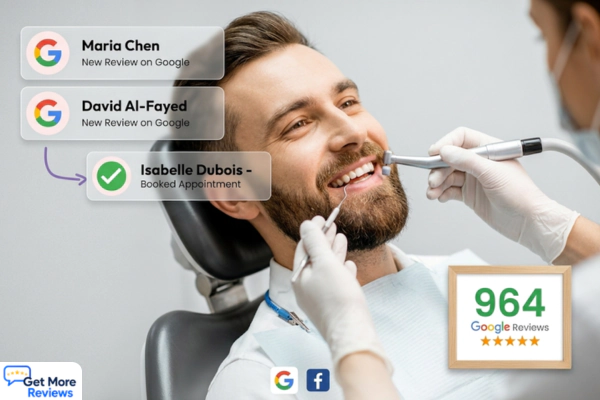
Most patients choose a dentist based on Google reviews. Get More Review helps dental practices collect more patient reviews after appointments using WhatsApp, SMS, email, and QR codes. Smart routing catches unhappy patients before they post publicly.

Why it matters
Why dental practices need a consistent review strategy
A dental practice with 4.8 stars and 60 reviews consistently attracts new patients over a competitor with 3.9 stars and 12 reviews, even if the clinical quality is identical. Most people searching for a new dentist make their decision based entirely on what they see in Google Maps before they ever visit a website.
The challenge for dental practices is that patient experience spans weeks or months. A patient may be satisfied after their cleaning but never think to leave a review unless prompted. Without a consistent system for asking after every appointment, your Google rating reflects only the small minority who were motivated enough to review spontaneously.
Get More Review automates the outreach. After each appointment, patients receive a review request by WhatsApp, SMS, or email. Happy patients are taken directly to your Google or Healthgrades page to leave a review. Patients with concerns see a private feedback form so you can resolve the issue before it appears publicly.
How it works
How Get More Review collects reviews for dentists
Connect your Dental Practice profile
Search your business name in Get More Review. Your Google Business Profile connects automatically and your review link and QR code are ready in seconds.
Upload your customer contacts
Import your customer list by CSV or add contacts manually. Include phone numbers for WhatsApp and SMS outreach, and email addresses for email sequences.
Send your first review campaign
Choose your channels: WhatsApp, SMS, email, or QR code at your location. Get More Review sends a personalised review request to each customer and follows up automatically.
Smart routing protects your rating
Customers who rate 4 to 5 stars go directly to Google to leave a public review. Customers who rate 1 to 3 stars see a private feedback form so you can resolve the issue before it goes public.
Monitor and grow
Watch your Google rating improve as new reviews come in. Your real-time dashboard shows all reviews across every platform alongside your campaign performance.
Timing and channels
When and how to ask for reviews as a dental practice
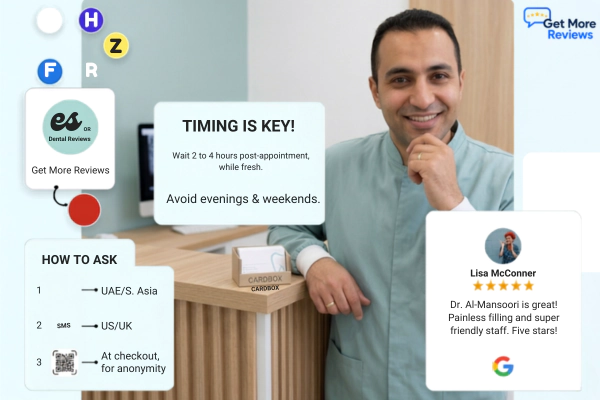
Best time to ask: Send the review request 2 to 4 hours after the appointment while the experience is still fresh. Avoid sending during evenings or weekends when patients are unlikely to act.
Channel guidance: WhatsApp works well for dental patients in UAE and South Asian markets. SMS converts well in the US and UK. QR codes on appointment cards and checkout desks work for patients who prefer not to share a phone number.
Platforms to target: Google · Healthgrades · Zocdoc · Facebook · Yelp.
Get More Review lets you send review requests across all channels from one dashboard. You can direct customers to any platform and track which channels produce the highest response rates for your specific dentists business.
Smart routing for dentists
Every review request includes smart routing. Customers who rate their experience positively go straight to Google or your chosen platform. Customers who are unhappy see a private feedback form. You resolve the concern directly and it never appears as a public review. This is how dentists protect their online reputation while still collecting honest feedback from every customer.
How smart review routing worksReview request channels
Four ways to collect reviews from dental practices
Highest response rate. 44% average. Best for UAE India and Europe.
WhatsApp review requestsRelated resources
More tools and guides for dentists
Frequently asked questions
Common questions about review management for dentists
Ask every patient after their appointment using a direct Google review link sent by WhatsApp, SMS, or email. Get More Review automates this with a follow-up sequence that stops per patient once they leave a review. Most dental practices see new reviews within 48 hours of their first campaign.
Yes. Google allows dental practices to ask patients to leave reviews. What Google prohibits is incentivising reviews with discounts or gifts and selectively asking only patients you know are happy. Get More Review sends requests to all patients and lets them rate freely.
Google is the most important platform for local patient acquisition. Healthgrades and Zocdoc matter for patients using healthcare-specific directories. Facebook matters for practices with strong local community presence. Get More Review lets you direct patients to any of these platforms.
Smart routing catches unhappy patients before they reach Google. Patients who rate their experience 1 to 3 stars see a private feedback form. You can respond directly and resolve the concern before it ever appears publicly on your Google listing.
In most markets, 30 or more reviews with a 4.5 plus rating places you competitively in Google Maps for dental searches. More importantly, consistent new reviews each month signal to Google that your practice is active and satisfying patients.
Asking patients for a review using their name and contact details you already hold is generally considered compliant under HIPAA as long as you are not disclosing protected health information. The review request itself simply asks them to share their experience, not their medical details. Always consult your compliance advisor for your specific situation.
Start collecting more dental practice reviews today.
Get More Review automates your review requests by WhatsApp, SMS, email, and QR code. Smart routing protects your rating. Free to start. No credit card required.